Free download · PDF, Word, Excel & Google Sheets
Eisenhower Matrix Template:Free PDF, Word & Excel download
A printable, editable Eisenhower Matrix in four formats. Drop every task into a quadrant and walk away with a clear next step: do it, schedule it, delegate it, or eliminate it.
Prefer no file at all? Open the online matrix and sort tasks right in your browser.
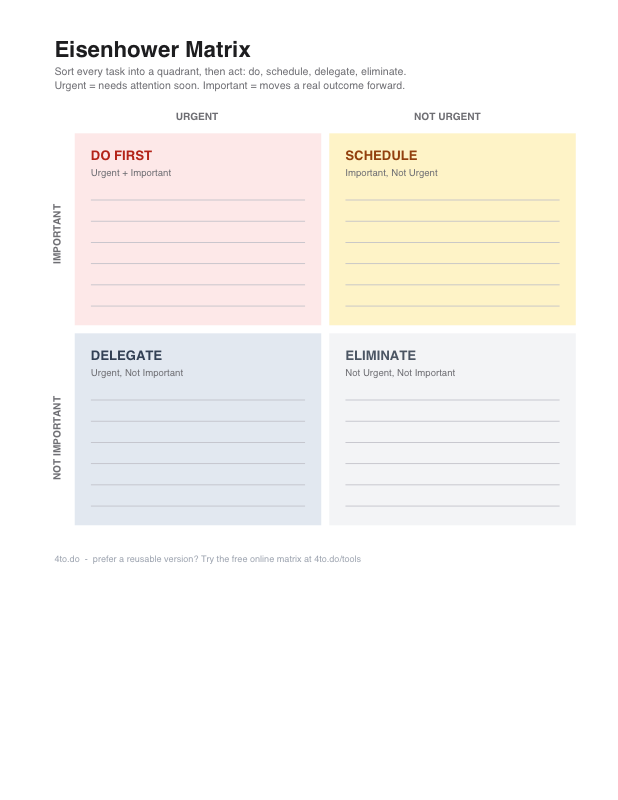
Download the Eisenhower Matrix template
Every format holds the same quadrant template. Pick the one that fits how you already work.
PDF template
PDF · 1 page · US Letter
Best for: Printing and sorting tasks by hand in under five minutes.
Print the page, or open it on a tablet. Write each task on a line inside one quadrant. Then give it a move: do, schedule, delegate, or eliminate.
Word template
DOCX · works in Word and Google Docs
Best for: Typing tasks into a document you can edit and share.
Open the file and click inside a quadrant cell. Type one task per line. Add rows if you need more room. Save a fresh copy each week instead of editing the old one.
Excel template
XLSX · pre-formatted 4 quadrant grid
Best for: Keeping a sortable matrix inside an existing workbook.
Open the sheet. The four quadrants are already colored. Type one task per cell under the matching quadrant. Review it weekly, since priorities shift.
Google Sheets template (CSV)
CSV · imports into Google Sheets or Excel
Best for: A flat task list you can filter, sort, and share with a team.
In Google Sheets, choose File → Import → Upload and pick the CSV. Type a task, mark whether it is urgent and important, and choose its quadrant. Filter by quadrant or next action to work through them one at a time.
How to fill out the template
Whichever format you picked, the method is the same: four steps that take a few minutes.
Dump everything first. Write every task down before judging it. You cannot prioritize what is still in your head.
Judge importance, then urgency. Ask what changes if the task is done well. Then ask whether it needs attention today.
Decide the next step. Every task leaves the matrix with a next step: do it, schedule it, delegate it, or eliminate it.
Review weekly. Priorities shift. A task sitting in Schedule can turn into a Do First task as its deadline approaches.
The four quadrants, explained
Call it an Eisenhower quadrant template or a four-box grid. The label matters less than what you do next. Sort each task once, then move it out of the matrix.
Urgent
Not urgent
Do First
Urgent + important
Work with a real deadline and consequences if it slips.
e.g. A production outage, or the tax form due tomorrow.
Schedule
Important, not urgent
Strategic work that prevents fires instead of fighting them.
e.g. The quarterly plan, exercise, the skill your next role needs.
Delegate
Urgent, not important
Requests that need motion, but not your best attention.
e.g. A vendor follow-up a teammate can cover.
Eliminate
Not urgent, not important
Activity that fills the day without changing the outcome.
e.g. The recurring status ritual nobody reads.
Rather skip the download?
The templates are made for printing and sharing. But if your priorities change often, a file becomes another thing to manage.
The free online matrix autosaves in your browser, needs no account, and lets you drag tasks between quadrants, so you can sort once and get back to work.
P.S. a free account keeps your matrix in sync on every device.
Frequently asked questions
Is the Eisenhower Matrix template free?
Which Eisenhower Matrix template format should I use?
How do I use the template in Google Sheets?
Is an Eisenhower quadrant template the same as a 4-quadrant template?
What are the four quadrants of the Eisenhower Matrix?
How often should I update the matrix?
What is the difference between the template and the online tool?
Keep your matrix with you
A free account syncs your matrix across devices, backs it up automatically, and stays free for the basics. Setup takes about a minute.
from the 4todo team