Free printable · Letter, A4 & weekly
Eisenhower Matrix Planner:Free printable PDF, no sign-up
A paper planner for the urgent-vs-important method. Print it, write the week at the top, and give every task a move: do, schedule, delegate, or eliminate.
Thinking of buying a bound planner? That works too. The free PDF is already printable, and the online matrix skips paper entirely.
Download the planner
Same grid, three cadences. Letter for US printers, A4 for everywhere else.
One-page planner
PDF · 1 page · Letter or A4
Best for: A single sheet that holds the whole week at a glance.
Print the page and write the week at the top. Fill each quadrant with what is on your plate right now. Pick the three moves at the bottom, then work the list.
Weekly planner
PDF · 1 page · Letter or A4
Best for: Sunday-night planning when the week ahead looks crowded.
Sort the week into the grid up top. Use the ruled space below to plan each move: do, schedule, delegate, eliminate. Reprint next week. Carry over only what still earns its spot.
Monthly planner
PDF · 1 page · Letter or A4
Best for: A wider lens: the important work that keeps slipping week to week.
Fill it once at the start of the month. Keep it pinned where you plan the week. Check the Schedule quadrant first: that is where the month is won.
What the planner looks like
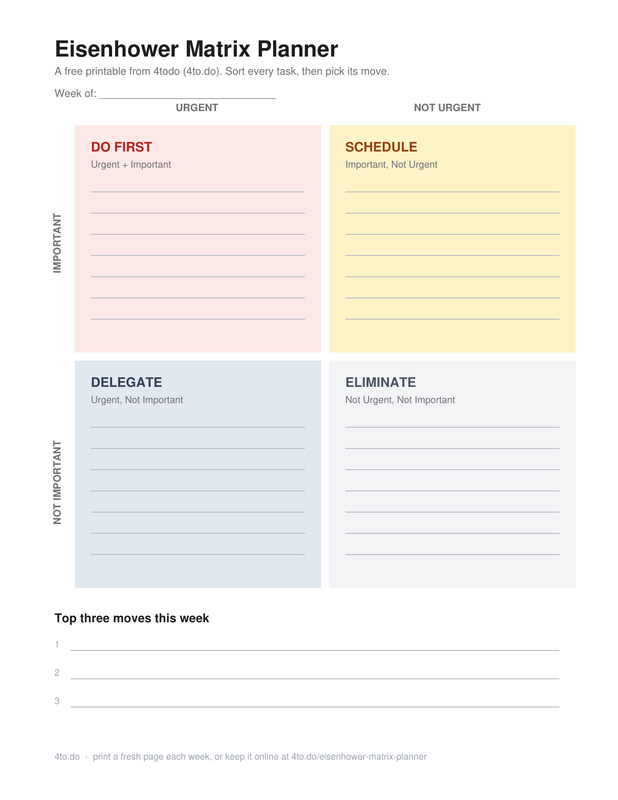
A date line up top, the four quadrants with ruled lines in the middle, and a short strip at the bottom for the three moves you commit to.
Urgent
Not urgent
Do First
Urgent + important
Work with a real deadline and consequences if it slips.
e.g. A production outage, or the tax form due tomorrow.
Schedule
Important, not urgent
Strategic work that prevents fires instead of fighting them.
e.g. The quarterly plan, exercise, the skill your next role needs.
Delegate
Urgent, not important
Requests that need motion, but not your best attention.
e.g. A vendor follow-up a teammate can cover.
Eliminate
Not urgent, not important
Activity that fills the day without changing the outcome.
e.g. The recurring status ritual nobody reads.
How to use the printed planner
Paper changes the routine a little. Four habits that make a printed matrix actually work.
Print it before the week starts. Monday morning works. So does Sunday night. The planner is a snapshot of right now, not a system of record.
Write in pencil. Priorities will move. An eraser beats a strikethrough when a Schedule task turns urgent mid-week.
One task per line. If a task needs a paragraph to describe, it is a project. Break it until each line is a single action.
Re-sort every Monday. Print a fresh page each week. Carry over only what still earns its spot, and let the rest go.
Print settings that just work
Two minutes in the print dialog saves a blurry, shrunken sheet. The defaults that matter:
Print at 100% scale. Skip "fit to page". Shrinking eats the writing space; at full size every ruled line fits normal handwriting.
Single-sided, plain paper. No special stock needed. A sheet of plain printer paper is the whole supply list.
Match your printer, not your country. Letter is the US default, A4 nearly everywhere else. Both versions hold the same planner, so pick whichever tray is already loaded.
Print a small stack. Three or four at once. When the week ends, the next blank page is already waiting.
One page, weekly, or monthly?
All three versions hold the same matrix. The difference is how often you reprint and how wide a lens you need.
One page
Reprint as needed
The flat sheet. Best when the week fits in one look and you want the least ceremony between you and a sorted list.
Weekly
Reprint every Monday
Grid on top, ruled space for the moves below. Best for the week that has too much in it, planned before it starts.
Monthly
Reprint on the first
Same sheet, wider lens. Best for the important, not-urgent work that a busy week keeps pushing around.
Daily
Better on screen
If priorities reshuffle every day, paper is the wrong tool. The online matrix autosaves as you drag tasks between quadrants.
A filled-in example
An empty grid is hard to picture. This is what a real week looks like once the sorting is done.
Urgent
Not urgent
Do First
- Send the signed contract before Friday
- Fix the checkout bug blocking launch
Schedule
- Block Thursday morning for the quarterly plan
- Book the dentist appointment
Delegate
- Ask Sam to run the vendor follow-up
- Hand meeting notes to ops
Eliminate
- Drop the status meeting nobody reads
- Unsubscribe from the launch recap thread
Top three moves this week
- Contract out the door Monday.
- Calendar block for the plan.
- Vendor email off my plate.
Frequently asked questions
Is the Eisenhower Matrix planner free?
Can I edit the planner on a computer?
Do I need an account?
A4 or Letter: which should I print?
How is the planner different from the template?
How often should I reprint it?
Rather skip the printer?
The planner is made for paper. But if your priorities change every day, a fresh sheet becomes another chore.
The free online matrix autosaves in your browser, needs no account, and lets you drag tasks between quadrants, so you can sort once and get back to work.
P.S. a free account keeps your matrix in sync on every device.
Keep your matrix with you
A free account syncs your matrix across devices, backs it up automatically, and stays free for the basics. Setup takes about a minute.
from the 4todo team