Free printable · Letter & A4 · also online
The Four Quadrant To-Do List:Free printable PDF & how to use it
A normal to-do list keeps every task equal. This one sorts them: do first, schedule, delegate, or eliminate. Print the sheet, fill it in, and work the top-left box first.
No printer? Sort the same four quadrants online for free, no sign-up.
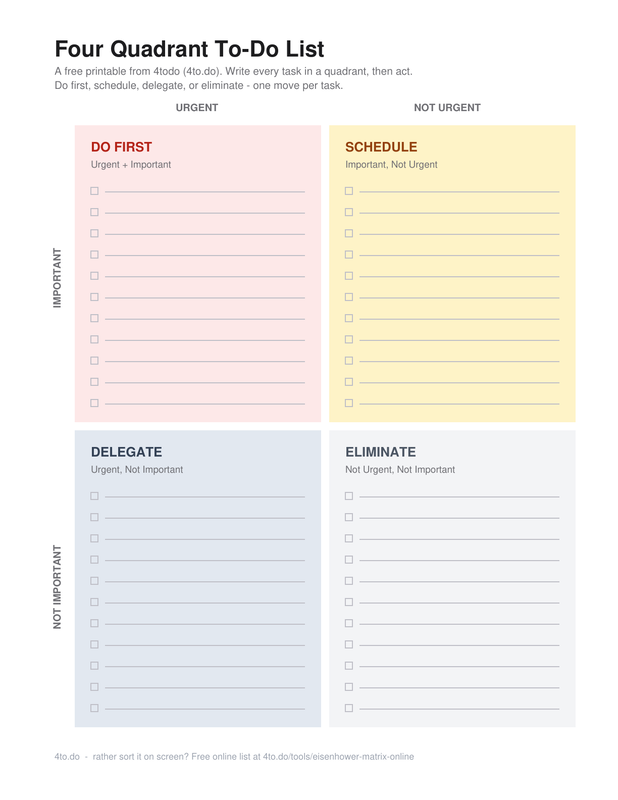
Download the four quadrant to-do list
One PDF, both paper sizes. A checkbox sits beside every ruled line.
Printable checklist
PDF · 1 page · Letter or A4
Best for: a week you can hold in one hand. Print it Sunday, work top-left first.
Write every task on a line inside one quadrant. Check it off when its move is done: did it, scheduled it, delegated it, or deleted it.
What is a four quadrant to-do list?
A four quadrant to-do list is a task list drawn as a two-by-two grid. One axis asks whether a task is urgent; the other asks whether it is important. Cross them and every task lands in one of four boxes: do first, schedule, delegate, or eliminate. Each box comes with its own verb.
You will also hear it called a 4 square to-do list, a four-box matrix, or the Eisenhower Matrix. All the same idea: a flat list tells you what to do, a quadrant tells you what to do first and what to drop entirely.
What goes in each quadrant
Real examples from work, study, and life, so sorting your own list takes minutes, not a second meeting with yourself.
Urgent
Not urgent
Do First
Urgent + important
Crises and real deadlines. These tasks get your next free hour.
- Work: ship the fix for the payments outage
- Study: finish the paper due at midnight
- Life: pay the bill before the late fee lands
Schedule
Important, not urgent
The work that prevents fires. Put it on the calendar before it turns urgent.
- Work: block time for the quarterly roadmap
- Study: review notes weekly, before finals loom
- Life: book the annual checkup
Delegate
Urgent, not important
Time-sensitive for someone, not necessarily for you. Hand it to the right owner.
- Work: ask a teammate to run the vendor demo
- Study: split the group project slides
- Life: have your partner grab the groceries
Eliminate
Not urgent, not important
Activity that fills the day without moving anything. Delete it and get the time back.
- Work: skip the meeting with no agenda
- Study: stop re-highlighting the textbook
- Life: delete the game you open while waiting
Why a four quadrant list beats a normal to-do list
A flat list answers “what is on my plate?” A quadrant answers the harder question: “what deserves my next hour?”
Normal to-do list
Four quadrant list
Ordered by when you wrote it down
Ordered by what the task does
"Buy stamps" and "finish the plan" share a line
Every task gets a verb: do, schedule, delegate, delete
Work top to bottom, easy things first
Work the top-left first, ignore the bottom-right
Stephen Covey's four quadrants
Stephen Covey made this grid famous in The 7 Habits of Highly Effective People, borrowing a line often attributed to Dwight Eisenhower: “I have two kinds of problems, the urgent and the important.” Covey called it the time management matrix and numbered the boxes Q1 through Q4.
His argument was mostly about Quadrant II, the box for important but not urgent work. That is where planning, prevention, and learning live, and where people underinvest because nothing there is on fire yet.
If you came looking for Covey's four quadrants as a PDF: this printable is the same matrix. It just labels the boxes Do First, Schedule, Delegate, and Eliminate instead of Q1 to Q4. The verbs are easier to act on than roman numerals.
Sort a list in five minutes
Grab whatever list you already have. Five passes and every task has a box and a move.
Write the whole list down. Every open task, unjudged. You cannot sort what is still rattling around in your head.
Mark each task urgent or not. Urgent means attention soon, or the consequence is real. Everything else is not urgent, even if it feels loud.
Mark each task important or not. Important means it moves a real outcome forward. If nobody would notice it undone, it is not important.
Drop each task in its box. Urgent and important goes to Do First, important alone to Schedule, urgent alone to Delegate, neither to Eliminate.
Give every task its move. A four quadrant list is not done until each task has a verb: do it, schedule it, delegate it, or delete it.
Frequently asked questions
Is a four quadrant to-do list the same as the Eisenhower Matrix?
Is this the same as a 4 square to-do list?
Can I use it online instead of printing?
Should I print it or keep it digital?
Do you have it as a Word or Excel file?
The same four quadrants, no printer required
Paper is great until priorities move twice in one afternoon. The free online matrix autosaves in your browser, needs no account, and lets you drag tasks between quadrants.
P.S. a free account keeps your list in sync on every device.
Keep your list with you
A free account syncs your matrix across devices, backs it up automatically, and stays free for the basics. Setup takes about a minute.
from the 4todo team